

Updated Mar-2026 Test Engine or PDF for the Nutanix NCP-CN test to help you quickly prepare for the Nutanix exam!
Full NCP-CN Practice Test and 111 unique questions with explanations waiting just for you, get it now!
NEW QUESTION # 40
A Platform Engineer is preparing an AWS instance using KIB for becoming an NKP cluster node. During the process, the source AMI is successfully cloned, and multiple preparation steps have occurred against the cloned AMI, such as gathering OS-release facts and uploading image bundles to it. However, the process encounters an error and ultimately fails. What is one troubleshooting step the engineer can perform that may help identify the root cause of the issue?
- A. Rerun the KIB command, including the parameter to instruct Ansible not to automatically delete the cloned AMI on error. This way the OS image can be accessed and further inspected.
- B. Rerun the KIB command, including the parameter to instruct Packer not to automatically delete the cloned AMI on error. This way the OS image can be accessed and further inspected.
- C. Rerun the KIB command, including the pause parameter, so that each command in the KIB-prep sequence and its return can be reviewed in detail before allowing the prep process to continue.
- D. Rerun the KIB command, including the parameter to set the verbosity level to debug, so that all issued AWS CLI commands and their returns are included and added to an exported log file for review.
Answer: D
Explanation:
The Kubernetes Image Builder (KIB) is used to create CAPI-compliant machine images for NKP cluster nodes, often leveraging tools like Packer to build AMIs for AWS. When the KIB process fails, troubleshooting requires detailed logs to identify the root cause. The NKPA course recommends increasing the verbosity of the KIB command to capture detailed output, including AWS CLI commands and their responses.
The correct troubleshooting step is to rerun the KIB command with the verbosity level set to debug. This is typically done using the --verbose or -v flag (e.g., -v debug) to enable debug-level logging, which includes all AWS CLI commands, their outputs, and errors, written to a log file for review. The Nutanix Cloud Native (NCP-CN) 6.10 Study Guide states: "To troubleshoot KIB failures, rerun the command with debug verbosity (-v debug) to log all operations, including AWS CLI interactions, to an exported log file for detailed analysis." This approach helps pinpoint issues like permission errors, misconfigurations, or failures in image bundle uploads.
Incorrect Options:
* A. Rerun with pause parameter: KIB does not support a pause parameter for step-by-step review, as per the NKPA course.
* C. Instruct Packer not to delete the cloned AMI: While preserving the AMI can help, the course prioritizes debug logging for initial troubleshooting. Packer's --on-error=abort flag exists, but it's less direct than debug logs.
* D. Instruct Ansible not to delete the cloned AMI: KIB primarily uses Packer, not Ansible, for AMI creation, making this option incorrect.
:
Nutanix Kubernetes Platform Administration (NKPA) Course, Section on Image Building.
Nutanix Cloud Native (NCP-CN) 6.10 Study Guide, Chapter on NKP Deployment Prerequisites.
Nutanix Cloud Bible, NutanixKubernetesPlatform Section: https://www.nutanixbible.com Kubernetes Image Builder Documentation: https://image-builder.sigs.k8s.io
NEW QUESTION # 41
NKP cluster nodes require a disk for some of its deployed components, outside of an application's persistent volume requirements. What are these components and where are they deployed?
- A. kubelet and containerd, in /opt/nkp
- B. kubectl and kubelet in /opt/nkp
- C. kubelet and containerd in /var/lib
- D. kubectl and kubelet in /var/nkp
Answer: C
Explanation:
According to the NKPA 6.10 documentation, the critical system components for NKP nodes are:
* kubelet
* containerdThese components are deployed in the standard Linux path: /var/lib.
Exact extract from the documentation:
"The kubelet and containerd services require disk space in /var/lib on the host operating system. It's essential to allocate sufficient storage in /var/lib to accommodate these core Kubernetes components." Reference:
Nutanix Kubernetes Platform Administration (NKPA) 6.10 - "Host Requirements for Cluster Nodes" NCP-CN 6.10 Study Guide - "Node OS Directory Requirements"
=======
NEW QUESTION # 42
When deploying NKP using the Nutanix provisioning method (CAPX), what are the supported OS platforms?
- A. CentOS and Rocky Linux
- B. CentOS and Ubuntu
- C. Flatcar, Rocky Linux, and Ubuntu
- D. Rocky Linux and Ubuntu
Answer: D
NEW QUESTION # 43
After loading the NKP bundles to a private registry in an air-gapped environment, a Platform Engineer now needs the Konvoy bootstrap image to create the bootstrap cluster. The Konvoy image has not been loaded into the registry. Which is the most viable command to load the Konvoy bootstrap image on the bastion host?
- A. nkp load image -f konvoy-bootstrap-image-<version>.tar --to-registry=<REGISTRY_URL>
- B. docker load -i konvoy-bootstrap-image-<version>.tar
- C. nkp push bundle --bundle konvoy-bootstrap-image-<version>.tar --to-registry=<REGISTRY_URL>
- D. docker image tag konvoy-bootstrap-image-<version>.tar version docker.io/konvoy-bootstrap version
Answer: B
Explanation:
In an air-gapped NKP deployment, the Konvoy bootstrap image (used to create the bootstrap cluster) must be available locally on the bastion host or in a private registry. The NKPA course specifies that after extracting the NKP Air-Gapped Bundle, the bootstrap image (e.g., konvoy-bootstrap-image-<version>.tar) is a tarball that needs to be loaded into the Docker daemon on the bastion host before creating the bootstrap cluster.
The most viable command is docker load -i konvoy-bootstrap-image-<version>.tar (Option A). This command loads the tarball into the local Docker daemon on the bastion host, making the image available for the nkp create bootstrap command to use. The Nutanix Cloud Native (NCP-CN) 6.10 Study Guide states: "In an air-gapped environment, load the Konvoy bootstrap image on the bastion host using docker load -i <image- tar-file> to make it available for creating the bootstrap cluster." After loading, the engineer can optionally tag and push the image to the private registry if needed, but the question focuses on loading the image on the host, which this command accomplishes.
Incorrect Options:
* B. docker image tag: This command is syntactically incorrect (version appears twice, and .tar is not part of a tag). Tagging is a subsequent step after loading, not the primary action to load the image.
* C. nkp push bundle: This is not a valid command for loading an image; it's closer to a bundle management action, but the syntax is incorrect.
* D. nkp load image: There is no nkp load image command in NKP; loading images is done via docker load.
:
Nutanix Kubernetes Platform Administration (NKPA) Course, Section on Air-Gapped Deployments.
Nutanix Cloud Native (NCP-CN) 6.10 Study Guide, Chapter on NKP Deployment Prerequisites.
Nutanix Cloud Bible, NutanixKubernetesPlatform Section: https://www.nutanixbible.com
NEW QUESTION # 44
A Platform Engineer would like to deploy an NKP Platform Application to all the clusters within an NKP workspace from the command line. What is the command set to use, and what parameters must be specified with it?
- A. The nkp create appdeployment command set would be utilized. The application ID & version, as well as the NKP workspace of the clusters, must be provided.
- B. The nkp deploy app command set would be utilized. The application ID, as well as the NKP workspace of the clusters, must be provided.
- C. The nkp deploy platform-app command set would be utilized. The application ID, as well as the NKP workspace of the clusters, must be provided.
- D. The kubectl create appdeployment command set would be utilized. The application ID, as well as the NKP workspace of the clusters, must be provided.
Answer: A
NEW QUESTION # 45
When deploying an NKP cluster onto air-gapped, pre-provisioned servers, Konvoy Image Builder is utilized to prepare the servers to become NKP cluster nodes.
What does the konvoy-image upload command do as a part of this preparation process?
- A. The command is used to upload OS hardening scripts to the server (must be client supplied).
- B. The command uploads artifacts to the servers such as the container runtime, the OS bundle, and Kubernetes components, including optional OS hardening scripts (must be client supplied).
- C. The command uploads artifacts to the servers such as the container runtime, the OS bundle, and Kubernetes components.
- D. The command is used to create a konvoy userid on the servers, as well as upload artifacts to them such as the container runtime, the OS bundle, and Kubernetes components.
Answer: C
NEW QUESTION # 46
An organization is setting up a new set of NKP clusters for R&D. The R&D director requires full admin access for the team on infrastructure dedicated to R&D.
What is the proper method for the engineer to ensure these objectives are met?
- A. Create an 'R&D' NKP workspace
Create an 'R&D' infrastructure provider in this workspace
Create an 'R&D' NKP group for the R&D team members and assign admin-level roles within Deploy the NKP clusters into the 'R&D' workspace - B. Create an 'R&D' NKP workspace and project within this workspace
Create an NKP infrastructure provider in the 'R&D' NKP project
Create an 'R&D' NKP group for the R&D team members and assign admin-level roles within this project Deploy the NKP clusters into the 'R&D' workspace - C. Create an 'R&D' NKP connector and infrastructure provider
Create an 'R&D' NKP group and assign it admin-level roles
Assign the 'R&D' NKP group to the 'R&D' NKP connector
Deploy the NKP clusters into the 'R&D' workspace - D. Create an 'R&D' NKP connector and infrastructure provider
Create an 'R&D' NKP group and assign it admin-level roles
Assign the 'R&D' NKP group to the 'R&D' NKP infrastructure provider
Deploy the NKP clusters into the 'R&D' workspace
Answer: A
Explanation:
The NKPA 6.10 documentation and Nutanix Best Practices recommend using workspaces to segment cluster deployments and their associated infrastructure providers, as well as to manage access control through RBAC.
The typical workflow is:
* Create an NKP workspace dedicated to the R&D environment.
* Create an infrastructure provider (e.g., vSphere, AHV) scoped to that workspace.
* Create an NKP group for the R&D team and assign admin roles to this group within the workspace.
* Deploy workload clusters in this workspace, leveraging the scoped infrastructure provider.
This ensures that:
* The R&D team has full administrative control over their resources.
* Clusters and infrastructure are logically isolated in the R&D workspace.
* RBAC policies are applied cleanly within the workspace context.
Reference:
Nutanix Kubernetes Platform Administration (NKPA) 6.10 - "Workspaces and RBAC" NCP-CN 6.10 Study Guide - "Workspace and Cluster Management Best Practices"
NEW QUESTION # 47
A Platform Engineer has been tasked with backing up and restoring a production environment to ensure persistent data is available during a disaster at a primary site. What is recommended for backup and restore production use cases?
- A. Rook Ceph
- B. External Storage Class
- C. S3-compatible API
- D. Protection Domain
Answer: C
NEW QUESTION # 48
A Platform Engineer is deploying a new Kubernetes application in Amazon Web Services (AWS) Elastic Container Service for Kubernetes (EKS) and Azure Kubernetes Service (AKS). The engineer's team has decided to use a custom image instead of the default images provided by AWS or Azure for their clusters. What functionality will the engineer lose in both AWS EKS and Azure AKS by choosing to use a custom image?
- A. Ability to use GPUs and persistent storage
- B. Built-in autoscaling and security capabilities
- C. Cluster networking and load balancing
- D. Native monitoring tools, logging, and alerting
Answer: B
NEW QUESTION # 49
A Platform Engineer for an organization does research in Antarctic
a. The engineer is preparing a bastion host for deploying NKP while the infrastructure is isolated. Which programs should the engineer ensure are installed on a bastion host before shipping the infrastructure?
- A. oc and kubectl
- B. kubectl and nkp
- C. awscli and nkp
- D. oc and az
Answer: B
NEW QUESTION # 50
In an effort to control cloud cost consumption, auto-scale is configured to meet demands as needed.
What is the behavior for when nodes are scaled down?
- A. Node is changed to a status of Hibernate.
- B. Node is changed to a status of Power-Off for stand-by.
- C. Node is paused in Kubernetes and the infrastructure continues to consume the resources at the current level.
- D. Node is CAPI deleted from its infrastructure provider, effectively removing it from its hypervisor.
Answer: D
Explanation:
As per the NKPA 6.10 documentation and cluster autoscaler behavior, when nodes are scaled down in NKP (or any CAPI-managed environment), the node is deleted from the infrastructure provider (vSphere, AWS, Nutanix, etc.). This effectively removes it from both the cluster and the underlying hypervisor or cloud provider, thus freeing up resources and reducing costs.
Reference:
Nutanix Kubernetes Platform Administration (NKPA) 6.10 - "Cluster Autoscaler Node Deletion Behavior" NCP-CN 6.10 Study Guide - "Autoscaler Impact on Infrastructure Resources"
NEW QUESTION # 51
A Platform Engineer for an organization needs to deploy NKP into AWS while using custom credentials for authenticating. Which flag should the engineer use when starting to bootstrap the cluster installation?
--aws-profile=<my-profile><br> B. --cloud-credentials=<my-profile><br> C. --with-aws-bootstrap- credentials=true<br> D. --aws-access-key=<aws access="" key=""> --aws-secret-key=<aws secret="" key=""
></aws></aws></my-profile></my-profile>
Answer:
Explanation:
When deploying NKP to AWS, the bootstrap process requires AWS credentials to interact with AWS APIs for provisioning resources like EC2 instances. The NKPA course specifies that the nkp CLI supports the -- aws-profile flag to specify a custom AWS profile for authentication. This profile, defined in the AWS credentials file (~/.aws/credentials), contains the access key and secret key for the desired AWS account.
The Nutanix Cloud Native (NCP-CN) 6.10 Study Guide states: "To deploy NKP on AWS with custom credentials, use the --aws-profile=<profile-name> flag during the nkp create bootstrap command to reference a specific AWS profile." This approach leverages the AWS CLI's profile management, ensuring secure and flexible credential handling. For example, the command would be nkp create bootstrap --aws-profile=my- profile --kubeconfig bootstrap-cluster.conf.
Incorrect Options:
* B. --cloud-credentials=<my-profile></my-profile>: This flag is not used by the nkp CLI. The NKPA course specifies --aws-profile for AWS.
* C. --with-aws-bootstrap-credentials=true: This flag does not exist in the NKPA documentation for NKP bootstrap.
* D. --aws-access-key=<aws access="" key=""> --aws-secret-key=<aws secret="" key=""></aws><
/aws>: While these flags may be used in some tools, the NKPA course recommends using --aws-profile to avoid hardcoding sensitive credentials.
Nutanix Kubernetes Platform Administration (NKPA) Course, Section on AWS Deployment.
Nutanix Cloud Native (NCP-CN) 6.10 Study Guide, Chapter on Bootstrap Configuration.
Nutanix Cloud Bible, NutanixKubernetesPlatform Section: https://www.nutanixbible.com AWS CLI Documentation: https://docs.aws.amazon.com/cli
NEW QUESTION # 52
A dev team needed to optimize their logging system to be more robust, because the CPU and memory limits were insufficient, which caused delays in log collection and processing during times of high demand.
After a deep performance analysis, they decided to increase the CPU limits from 1 to 4 and the memory from 1000Mi to 4Gi.
Which ConfigMap should the development team run with custom resource requests and limit values for fluentd?
- A. bashCopy
[nutanix@nkp-boot ~]$ cat <<EOF > configmap.yamlapiVersion: v1kind: ConfigMapmetadata:name: logging-operator-logging-overridesnamespace: kommanderdata:values.yaml: |fluentd:resources:limits:cpu: 4memory: 4Girequests:cpu: 4memory: 4GiEOF - B. bashCopy
[nutanix@nkp-boot ~]$ cat <<EOF > configmap.yamlapiVersion: v1kind: ConfigMapmetadata:name: logging-operator-logging-overridesnamespace: kommanderdata:values.yaml: |fluentdresourceslimitscpu 4memory 1000Mirequestscpu 1memory 4GiEOF - C. bashCopy
[nutanix@nkp-boot ~]$ cat <<EOF > configmap.yamlapiVersion v1kind ConfigMapmetadataname logging-operator-logging-overridesnamespace kommanderdatavalues.yaml |fluentdresourceslimitscpu 1memory 1000Mirequestscpu 4memory 4GiEOF - D. bashCopy
[nutanix@nkp-boot ~]$ cat <<EOF > configmap.yamlapiVersion v1kind ConfigMapmetadataname logging-operator-logging-overridesnamespace kommanderdatavalues.yaml |fluentdresourceslimitscpu 4EOFvalues.yaml |fluentdresourceslimitscpu 4memory 4Girequestscpu 1memory 1000MiEOF
Answer: A
NEW QUESTION # 53
What is a prerequisite for upgrading an NKP license to Ultimate?
- A. Size the Sidecar containers appropriately to support the installation of default platform services.
- B. Size the ETCD nodes appropriately to support the installation of default platform services.
- C. Size the Control Plane nodes appropriately to support the installation of default platform services.
- D. Size the Worker nodes appropriately to support the installation of default platform services.
Answer: C
Explanation:
The NKPA course explains that upgrading an NKP license to the Ultimate tier unlocks advanced features such as fleet management, air-gapped deployments, and additional platform services (e.g., monitoring, logging, backup/restore). These services are deployed on the Management cluster and require sufficient resources to operate effectively. A key prerequisite is to size the Control Plane nodes appropriately to support the installation of default platform services (Option C).
The Control Plane nodes in the NKP Management cluster run critical components like the API server, controller manager, and Kommander, as well as platform services such as Prometheus, Grafana Loki, and Velero. The Ultimate license increases resource demands due to the expanded functionality, and undersized Control Plane nodes can lead to performance issues or failed deployments. The Nutanix Cloud Native (NCP- CN) 6.10 Study Guide states: "Before upgrading to an NKP Ultimate license, ensure the Control Plane nodes of the Management cluster are sized appropriately (e.g., sufficient CPU, memory, and storage) to support the additional default platform services enabled by the license." For example, Control Plane nodes might need to be scaled to at least 4 vCPUs and 16 GB RAM, depending on the workload.
Incorrect Options:
* A. Size the Sidecar containers appropriately: Sidecar containers are typically used for specific workloads (e.g., logging agents), not for platform services deployment, and are not a licensing prerequisite.
* B. Size the ETCD nodes appropriately: While etcd is part of the Control Plane, the course refers to the Control Plane nodes as a whole, not etcd specifically, as the sizing requirement.
* D. Size the Worker nodes appropriately: Worker nodes run user workloads, not the platform services, which are deployed on the Control Plane in the Management cluster.
:
Nutanix Kubernetes Platform Administration (NKPA) Course, Section on Licensing Upgrades.
Nutanix Cloud Native (NCP-CN) 6.10 Study Guide, Chapter on Day 2 Operations.
Nutanix Cloud Bible, NutanixKubernetesPlatform Section: https://www.nutanixbible.com
NEW QUESTION # 54 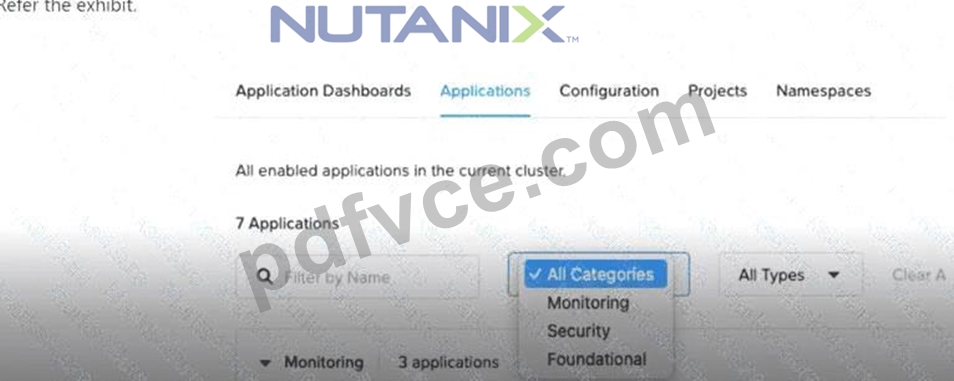
After selecting the Production workspace and selecting View Details for the cluster prod-01, a Platform Engineer wanted to enable the NKP Insights application. This application is under the Observability category, but this category doesn't appear in the list.
Which action should the engineer take to be able to deploy the NKP Insights application in the Kubernetes cluster for this workspace?
- A. Select Applications in the left menu, press the three-dot menu in the NKP Insights application option, and select Enable.
- B. Select Insights in the left menu and select the Enable button.
- C. Select Clusters in the left menu, select Applications, and select Enable in the NKP Insights three-dot menu.
- D. Select Clusters in the left menu, select View Details for the cluster prod-01, then in the Application Dashboard, select Enable in the NKP Insights three-dot menu.
Answer: D
Explanation:
As per the NKPA 6.10 documentation under "Day 2 Operations: Managing Applications", the recommended procedure to enable an application (like NKP Insights) involves accessing the cluster's Application Dashboard. The NKP Insights application does not appear in the general category list if the cluster does not have the correct context or if the application category is not globally enabled.
The specific procedure to enable NKP Insights includes:
* Navigate to the Clusters section from the left-side menu.
* Select View Details for the target cluster (prod-01 in this case).
* In the Application Dashboard of that specific cluster, locate the NKP Insights application.
* Click the three-dot menu (ellipsis) for NKP Insights and select Enable.
Reference:
Nutanix Kubernetes Platform Administration (NKPA) 6.10 - "Enabling Applications in a Specific Cluster" NCP-CN 6.10 Study Guide - "Application Deployment in Workspaces" This exact approach ensures that NKP Insights is deployed in the proper cluster-level context, circumventing the missing "Observability" category in the global Applications view.
=======
NEW QUESTION # 55
A technology company has decided to migrate its infrastructure to NKP to improve the scalability and management of its applications. After a successful initial implementation, the operations team faces a new challenge of validating the HelmReleases to ensure that all applications are running correctly and avoid problems in production. Which command should the company execute to know the right status of their HelmReleases?
- A. kubectl apply -f fluent-bit-overrides.yaml
- B. kubectl get helmreleases -n ${PROJECT_NAMESPACE}
- C. kubectl edit helmreleases -n ${PROJECT_NAMESPACE}
- D. kubectl get namespaces
Answer: B
NEW QUESTION # 56
A Platform Engineer would like to install some NKP applications, but with a few modifications to the default configuration specs of some of the components. Additionally, Velero itself can be disabled, as the company already utilizes a different backup utility for Kubernetes.
Which procedure would the engineer utilize to accomplish these goals when deploying the applications?
- A. Execute nkp install kommander --init to an output file.Set the custom specs for the components to be modified in the output file.Deploy the NKP applications using the nkp install kommander command, specifying the output file.Once the NKP applications install has completed, execute kubectl delete hr -n kommander velero.
- B. Execute nkp install kommander --init to an output file.Disable Velero in the output file and set the custom specs for the components to be modified.Deploy the NKP applications using the nkp install kommander command, specifying the output file.
- C. Execute nkp config kommander.Disable Velero in the resulting output file and set the custom specs for the components to be modified.Deploy the NKP applications using the nkp install kommander command, specifying the output file.
- D. Execute nkp config kommander --init to an output file.Disable Velero in the output file and set the custom specs for the components to be modified.Deploy the applications using the helm install command, specifying the output file.
Answer: B
NEW QUESTION # 57
Which NKP tier is required for the FIPS Compliant Build feature?
- A. Enterprise
- B. Advanced
- C. Starter
- D. Pro
Answer: A
NEW QUESTION # 58
A company has been modernizing on cloud-native platforms for the past few years and has been running some small consumer support utilities on their production NKP cluster. After a thorough testing and QA cycle with simulated workloads on a development cluster, the company is ready to bring their online retail application into the fold. While they have sufficient system resources to scale the NKP cluster properly from a performance standpoint, they also want to ensure they properly scale their monitoring stack's resource settings to retain a sufficient amount of data to see how overall system resource utilization trends for the NKP cluster over several months' time with the added workloads. Which NKP Platform Application component should the company be most concerned with adjusting, and how should their Platform Engineer adjust it?
- A. Adjust the resource settings for Prometheus by increasing its container resource limits and memory settings, as well as its storage.
- B. Adjust the number of replicas for the Fluent Bit deployment, as well as increase the amount of storage available for use by the NKP cluster.
- C. Adjust the resource settings for Fluent Bit by increasing its container resource limits and memory settings, as well as its storage.
- D. Adjust the number of replicas for the Prometheus deployment, as well as increase the amount of storage available for use by the NKP cluster.
Answer: A
Explanation:
The NKPA course explains that NKP's monitoring stack includes Prometheus for metrics collection and storage, and Fluent Bit for log collection and forwarding. To retain system resource utilization data over several months, the company must focus on Prometheus, as it is responsible for storing time-series metrics data, such as CPU, memory, and network utilization, which are critical for long-term trend analysis.
To handle the increased workload from the online retail application, the Platform Engineer should adjust Prometheus by increasing its container resource limits and memory settings to ensure it can process and store more metrics, and increasing its storage to retain data for several months. The Nutanix Cloud Native (NCP-CN) 6.10 Study Guide states: "For long-term metrics retention in NKP, scale the Prometheus deployment by increasing its resource limits (CPU and memory) and expanding its persistent storage to accommodate larger time-series data." This involves editing the Prometheus deployment's resource settings (e.
g., via kubectl edit deployment) and updating the PersistentVolumeClaim (PVC) to allocate more storage.
Incorrect Options:
* A. Adjust the number of replicas for Fluent Bit: Fluent Bit handles logs, not metrics. Increasing replicas does not address long-term metrics storage.
* B. Adjust the number of replicas for Prometheus: Increasing replicas improves availability but does not directly address storage or resource needs for metrics retention.
* C. Adjust the resource settings for Fluent Bit: Fluent Bit is for log collection, not metrics storage, and is not relevant for this use case.
:
Nutanix Kubernetes Platform Administration (NKPA) Course, Section on Monitoring and Platform Applications.
Nutanix Cloud Native (NCP-CN) 6.10 Study Guide, Chapter on Day 2 Operations.
Nutanix Cloud Bible, NutanixKubernetesPlatform Section: https://www.nutanixbible.com Prometheus Documentation: https://prometheus.io
NEW QUESTION # 59
In a financial company, a DevOps team is responsible for supporting all of the company's critical applications. Although the team was experienced, the manual management for cluster health checking was becoming increasingly complicated and prone to errors.
The team consulted its company's Platform Engineer on how to best address these issues. They told the engineer that events such as these were occurring
1.Omitting pod security standards.
2.Crashlooping cases.
3.Failed nodes when deploying or running kube-bench.
What recommendation should the engineer provide to the DevOps team?
- A. Run the nkp describe cluster --cluster-name=${CLUSTER_NAME} command.
- B. Create a MachineHealthCheck resource in YAML format.
- C. Use override ConfigMaps to configure alert rules.
- D. Use AlertManager and NKP Insights together.
Answer: D
NEW QUESTION # 60
......
Full NCP-CN Practice Test and 111 unique questions with explanations waiting just for you, get it now: https://certification-questions.pdfvce.com/Nutanix/NCP-CN-exam-pdf-dumps.html